Inno Setup Parameters


Inno Setup Parameters:
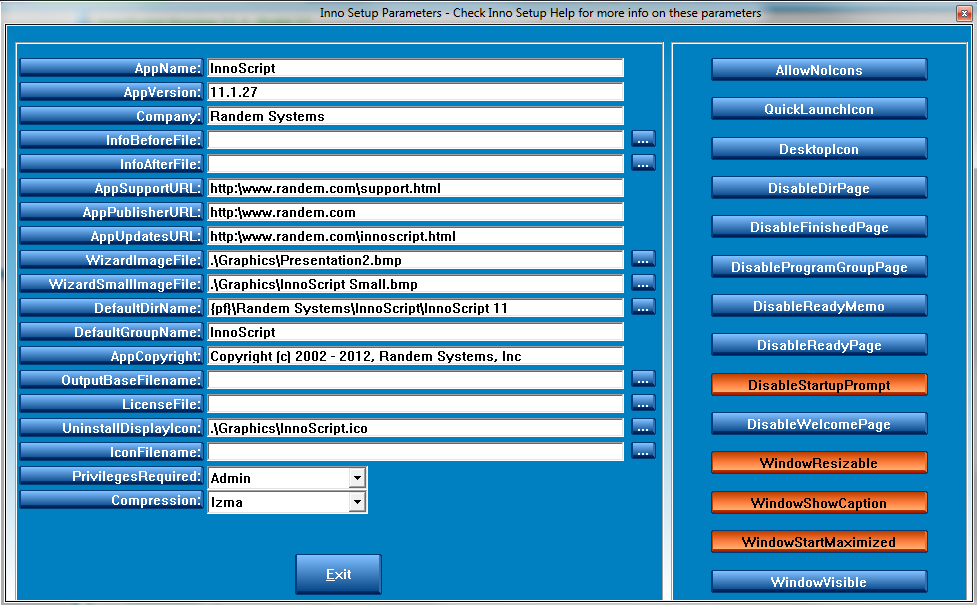
The Definitions of the following parameters can be found in the Inno Setup help section of Inno Setup. Some parameters (in the white areas) will be automatically filled in after the first run of the script creation. Some parameters are taken from the properties of the VBP and VBPROJ project files. It is suggested that you run InnoScript first so that it will fill out as much as it can; then you can modify the parameters after that.
AppName: AppVersion: Company: InfoBeforeFile: InfoAfterFile:
AppSupportURL: AppPublisherURL: AppUpdatesURL: WizardImageFile: WizardSmallImageFile:
DefaultDirName: DefaultGroupName: AppCopyright: AllowNoIcons: OutputBaseFilename:
LicenseFile: UnInstallDisplayIcon: IconFilename PrivilegesRequired: Compression:
DesktopIcon: QuickLaunchIcon:
Note: AppName, AppVersion and AppPublisher are added to the script after first run and are taken from the VBP project file from the following areas:
In VB6 from the main menu - Project->Project Properties->Make
AppName = Product Name + Major Version Number
AppVersion = Product Name + Major + Minor + Revision
AppPublisher = Company Name
IconFilename is the actual location of the icon file on your development system. InnoScript will copy the icon file to the {app} folder at install time.
Created with the Personal Edition of HelpNDoc: Free HTML Help documentation generator